
Disclaimer: LogicHelm is reader-supported. If you purchase through links on our site, we may earn a small affiliate commission at no extra cost to you.
Welcome to my in-depth Google Stitch review (2026). If you’re a developer who hates CSS or a founder with a napkin sketch but zero design budget, the last two years of AI have been promising but frustrating. We’ve had tools that generate images, but actual editable UI design has been missing. In this post, I break down whether Google Stitch is finally the solution.
Enter Google Stitch.
Launched quietly in late 2025 and significantly upgraded with Gemini 3 models recently, Stitch promises to turn text prompts and scribbles into fully layered Figma files and production-ready React code in seconds.
Is it the “Figma Killer” Twitter/X keeps screaming about? Or just another toy for the Google Graveyard? I spent the last 30 days building three real MVPs using only Google Stitch. Here is the honest, data-backed verdict on whether it deserves a spot in your 2026 tech stack.
🚀 Quick Verdict: Is Google Stitch Worth It?
The Bottom Line: Google Stitch is currently the fastest wireframing tool on the market. It excels at “0 to 1” creation, instantly converting sketches into clean React/Tailwind code. However, it lacks the complex logic capabilities of tools like V0 for full-stack apps and cannot replace a human designer for brand identity.
Rating: ⭐⭐⭐⭐½ (8.5/10)
Best For: Founders, Frontend Devs, and Early-stage Startups.
What is Google Stitch?
At its core, Google Stitch is an AI-powered interface design tool hosted in Google Labs. It sits comfortably between a no-code builder and a professional design tool like Figma.
Unlike Midjourney (which creates flat pixels), Stitch understands the structure of a UI. When you ask for a “SaaS dashboard,” it doesn’t just paint a picture; it builds the buttons, navigation bars, and data tables as separate, editable components.
The 2026 Upgrade
As of February, Stitch is powered by two distinct models:
- Standard Mode: Uses Gemini 2.5 Flash for instant, high-speed generation.
- Experimental Mode: Uses the new multimodal Gemini 3 Pro. This shift has largely fixed previous “hallucination” issues where buttons would lead nowhere or text would be gibberish.
Google Stitch Review: The 30-Day Field Test
I tested Stitch on three strict criteria: Speed, Code Quality, and Editability.
1. Key Features (The “Unique Selling Points”)
📷 Sketch-to-UI (Multimodal Input)
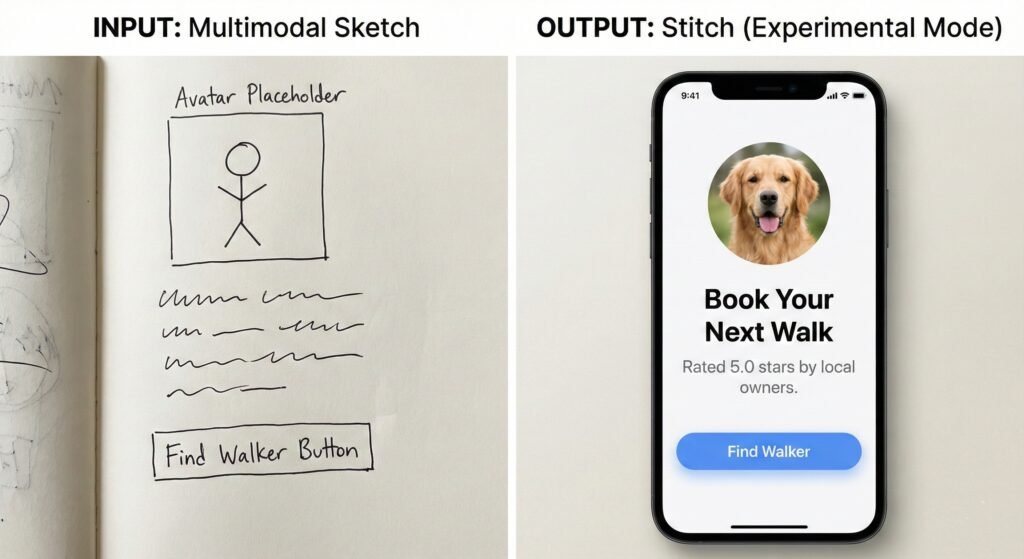
This is the standout feature. I drew a terrible wireframe of a “Dog Walking Uber” app on a notepad, took a photo, and uploaded it.
- The Result: Stitch didn’t just copy the layout; it interpreted my intent. It turned my squiggly lines into a standardized bottom nav bar and replaced my stick figure with a high-res placeholder avatar.
🎨 The “Deep” Figma Integration
Most AI tools export a flat PNG or a messy SVG. Stitch exports a .fig file where Auto-Layout is actually applied.
- Why this matters: You can resize the frame, and the buttons stay centered. For a designer, this saves hours of cleanup.
💻 Live Code Export
One click generates the frontend code. You can toggle between:
- React + Tailwind CSS
- HTML/CSS
- Flutter
2. Performance: Speed & Accuracy
I timed the workflow for building a standard “Settings Page” for a fintech app.
| Metric | Manual Design (Figma) | Stitch (Standard Mode) | Stitch (Experimental Mode) |
| Time to First Draft | 45 minutes | 12 seconds | 45 seconds |
| Component Accuracy | 100% | 85% | 95% |
| Responsiveness | Manual adjustment | Automatic | Automatic |
- The Speed: Using “Standard Mode” (Gemini 2.5 Flash), generation is nearly instant. It feels like magic.
- The Quality: “Experimental Mode” (Gemini 3) is slower but significantly smarter. It understands context. When I asked for a “dark mode crypto dashboard,” it didn’t just invert colors; it used specific shades of charcoal and neon green accents popular in Web3 designs.
3. The Code: Is it actually usable?
This is usually where AI design tools fail. I exported a “Pricing Table” component to React to see if it was spaghetti code.
- The Good: It uses semantic HTML (
<nav>,<button>, not just<div>soup). The Tailwind classes are logical (flex,justify-between,p-4). - The Bad: It struggles with complex interactivity. The JavaScript logic for a toggle switch wasn’t connected to state management. You still need a developer to wire it up.
Pricing (February 2026)
As of now, Google is keeping Stitch in a “Freemium/Labs” state to capture market share from V0 and Figma.
- Free Tier: Unlimited “Standard” generations (Gemini 2.5 Flash).
- Labs/Pro Access (Waitlist): Access to “Experimental Mode” (Gemini 3) and Image-to-UI features.
- Limit: 50 “Pro” generations per day for free users.
- Rumor: A $20/mo Workspace add-on is expected in Q2 2026.
Pros & Cons
| ✅ Pros | ❌ Cons |
| Speed: Reduces “Time to MVP” by roughly 70%. | Generic Aesthetics: Defaults to “Google Material” style unless heavily prompted. |
| Figma Handoff: Best Auto-Layout export in the industry. | No Complex Logic: Terrible for complex UX flows (can’t link multiple screens easily). |
| Gemini 3 Intelligence: Understands vague prompts like “make it look trustworthy.” | Inconsistent Text: Still occasionally uses “Lorem Ipsum” instead of context-aware copy. |
| Free (For Now): Generous quotas compared to V0. | Mobile-First Bias: Desktop dashboards sometimes feel like stretched mobile apps. |
Final Verdict: Should You Use Google Stitch?
After 30 days, I haven’t cancelled my Figma subscription, but my workflow has fundamentally changed. Google Stitch is not a “Designer Replacement”—it is the world’s fastest wireframing tool.
Buy/Try this if:
- You are a Founder: You need to show an investor what your app looks like today, not in two weeks.
- You are a Developer: You can build the backend, but your frontend designs look like Windows 95. Stitch handles the styling so you can focus on logic.
- You use Figma: The ability to jumpstart a project with editable layers is a massive time-saver.
Avoid this if:
- You need complex UX flows: If you are designing a multi-step banking wizard with conditional logic, Stitch will confuse you. Stick to Figma prototypes.
- You need a unique Brand Identity: Stitch designs are clean but “generic.” You will still need a human designer to inject soul into the product.
Final Score: 8.5/10
The best “0 to 1” design tool on the market right now.
Frequently Asked Questions (FAQ)
1. Is Google Stitch free?
Yes, currently Google Stitch is free to use via Google Labs. Users get unlimited standard generations and 50 experimental (Gemini 3) generations per day.
2. Can Google Stitch export to React?
Yes, Stitch exports clean, semantic code for React (with Tailwind CSS), HTML/CSS, and Flutter.
3. How does Google Stitch compare to V0?
V0 is generally better for full-stack code generation (connecting UI to logic), while Google Stitch excels at the visual design layer and Figma integration.
4. Does Google Stitch support dark mode?
Yes, you can toggle between light and dark modes instantly, or prompt specific color palettes.