
Disclaimer: LogicHelm is reader-supported. If you purchase through links on our site, we may earn a small affiliate commission at no extra cost to you.
Introduction
You already know video content drives more traffic, more engagement, and more sales than almost any other format. But here’s the problem most content creators, digital marketers, and small business owners run into every single day:
Making great videos is expensive, slow, and technically overwhelming.
Hiring a video editor costs hundreds of dollars per clip. Learning professional editing software takes months. And even when you find the time, you’re still staring at a blank timeline with no idea where to start.
If you’ve ever felt like video production is a wall you can’t scale — you’re not alone. Millions of businesses are leaving money on the table simply because they can’t produce video content fast enough to stay relevant.
That’s exactly the problem InVideo AI was built to solve.
InVideo AI is one of the best AI video generators available today — a platform that takes your ideas, scripts, or simple text prompts and turns them into polished, professional-grade videos in minutes. No camera. No editing skills. No production team required.
Why Video Creation Has Become a Business-Critical Skill
The pressure to produce video content isn’t slowing down. Short-form video dominates social media algorithms. YouTube remains the second-largest search engine on the internet. And email campaigns with video links generate significantly higher click-through rates than those without.
But the gap between the demand for video and the ability to produce it efficiently is growing — especially for:
- Content creators trying to publish consistently across YouTube, Instagram, and TikTok
- Digital marketers who need multiple video variations for A/B testing and ad campaigns
- Small-to-medium business owners (SMBs) who want professional brand videos without a production budget
Traditional video production simply doesn’t scale. You need a script, a shoot, a voiceover artist, an editor, motion graphics, captions, and then the whole process starts again for the next video. It’s a cycle that burns time, money, and creative energy.
There has to be a better way — and in 2026, there is.
Introducing InVideo AI: The Smarter Way to Create Videos
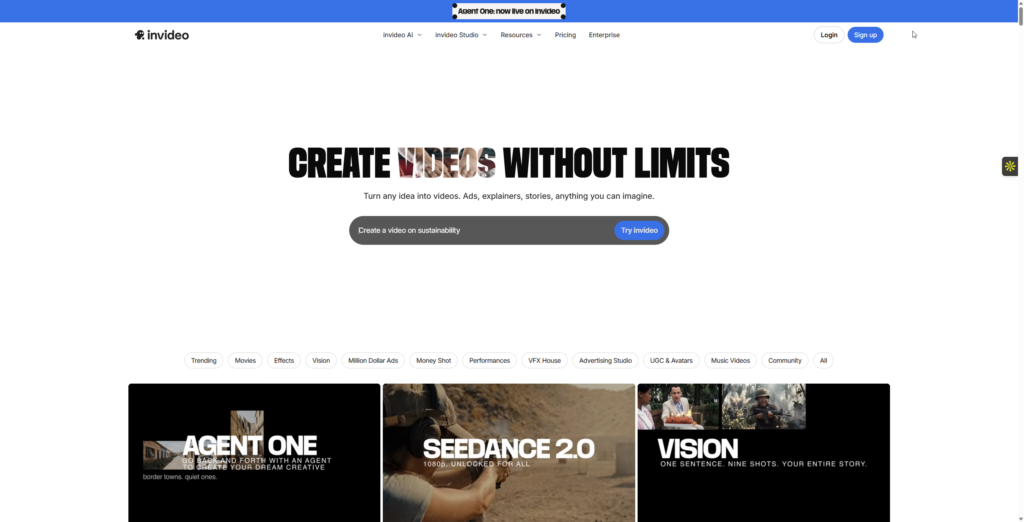
InVideo AI is a browser-based AI video generation platform that transforms text prompts, scripts, or article URLs into fully produced videos — complete with stock footage, AI voiceovers, captions, background music, and transitions.
It’s not just a video editor with AI features bolted on. It’s an end-to-end AI video creation workflow built from the ground up for people who need results without the production overhead.
Whether you’re a one-person content operation, a marketing team managing multiple brand channels, or a business owner who wants to stay visible online, InVideo AI compresses what used to take days into a process that takes minutes.
The Core Value Proposition: What Makes InVideo AI a Game-Changer
1. You Don’t Need to Know Anything About Video Editing
This is the single biggest barrier InVideo AI removes. You write a prompt — or paste in a script or article link — and the AI assembles a complete video for you. It selects footage, writes transitions, times the cuts, and syncs everything automatically.
The result: A video that would take a professional editor 3–5 hours to produce is ready in under 15 minutes.
2. It Scales With You
One of the most underrated advantages of InVideo AI is that it removes the bottleneck between having a content idea and having a published video. You can create multiple videos in the time it used to take to produce one. For marketers running campaigns and creators publishing multiple times per week, that’s not a feature — it’s a competitive advantage.
3. It Produces Videos That Look Professional
InVideo AI isn’t generating rough, clearly AI-made content. It draws from a large library of high-quality stock footage and media assets, layers in royalty-free music, adds styled captions, and applies clean visual formatting. The output is polished enough to publish directly to YouTube, use in paid ads, or embed on a business website.
4. It Understands Your Intent — Not Just Your Words
The AI behind InVideo isn’t just placing random clips over your text. It interprets the context and tone of your content and selects media accordingly. A prompt about a luxury brand gets a different visual treatment than a prompt about a startup product launch — and it does this automatically, without you manually curating every clip.
Key Features Breakdown
Feature 1: Text-to-Video Generation
Type a prompt — as simple as “Create a 60-second video explaining the benefits of email marketing for small businesses” — and InVideo AI generates a full video with a narrated script, relevant footage, captions, and background audio. This is the platform’s headline capability and arguably the fastest text-to-video workflow available for non-technical users.
Who benefits most: Content creators who need to ship videos daily, and business owners who want to explain their services without hiring a production crew.
Feature 2: AI Voiceover in 50+ Languages — With Voice Cloning
InVideo AI includes a built-in AI voiceover engine that generates natural-sounding narration across more than 50 languages and accents. You can select voice tone, pace, and gender — making it easy to match your brand’s audio identity without hiring voice talent. On paid plans, the platform also offers AI voice cloning: record a short 30-second sample of your own voice and InVideo AI replicates it for all future videos, giving your content a consistent, personal sound at scale.
Who benefits most: Digital marketers running multilingual ad campaigns, and SMBs that need a consistent branded voice across all video content without ongoing voice actor costs.
Feature 3: 16 Million+ Stock Assets — Including Premium iStock Footage
InVideo AI integrates with a library of over 16 million stock video clips, images, and audio tracks. On paid plans, this extends to premium iStock footage — giving your videos a noticeably more polished, commercial look compared to free stock-only tools. The AI automatically selects and places the most contextually relevant assets, but you can browse and swap them manually at any time if you want tighter creative control.
Who benefits most: Anyone who needs to produce varied, visually rich videos at scale without paying for a separate stock footage subscription on top of a video editor.
Feature 4: Automated Captions and Subtitles
Captions aren’t optional in 2026 — they’re essential for accessibility, SEO, and silent-scroll social media viewing. InVideo AI auto-generates synced captions for every video it produces, saving you the time and cost of manual transcription or third-party captioning services.
Who benefits most: Social media marketers, YouTubers, and any creator publishing to Instagram Reels or TikTok, where silent viewing is the default.
Feature 5: Conversational Editing With the “Magic Box” — Powered by Frontier AI Models
Once your video is generated, you don’t need to touch a timeline to edit it. InVideo AI’s Magic Box lets you refine your video using plain-English commands: type “shorten the intro,” “change the voiceover accent to British female,” or “replace scene 3 with something more energetic” — and the AI applies the change instantly. This conversational editing approach removes the biggest remaining friction point for non-editors.
In 2025, InVideo AI also integrated Google’s Veo 3.1 and OpenAI’s Sora 2 directly into its pipeline — two of the most advanced AI video generation models in the world. This means the AI-generated visuals in your videos can now achieve a cinematic, physics-accurate quality that was previously only available on standalone tools costing significantly more.
Who benefits most: Anyone who wants to iterate quickly on video drafts without learning timeline-based editing software, and creators who want frontier-quality AI visuals without managing multiple tool subscriptions.
Practical Use Cases: How to Put InVideo AI to Work Tomorrow
Use Case 1: Content Creator — Weekly YouTube Uploads Without Burnout
Imagine you’re a solo content creator publishing educational videos on personal finance. Every week, you have ideas — but scripting, finding footage, recording voiceovers, and editing eats your entire weekend.
With InVideo AI: Write a 200-word outline of your video topic. Paste it into InVideo AI as a prompt. In under 20 minutes, you have a fully narrated, captioned, and visually produced video ready to review and upload. You spend your remaining time engaging with your audience, not stuck in an editing timeline.
Use Case 2: Small Business Owner — Product and Service Explainer Videos
You run a local accounting firm and want to explain your tax preparation service to potential clients. You know a video on your homepage would convert better than text — but you don’t have a production budget or an in-house video team.
With InVideo AI: Type a prompt describing your service, your target client, and the key benefits you want to highlight. InVideo AI generates a clean, professional 90-second explainer video you can embed on your website and share on LinkedIn. Done — at a fraction of the cost of hiring a freelance video producer.
Honest Pros & Cons
✅ Pros
- Dramatically reduces video production time — from hours or days to minutes
- No prior editing skills required — true beginner-to-published workflow
- 16M+ stock assets, including premium iStock footage — no separate subscription needed
- AI voiceover in 50+ languages + voice cloning — ideal for global marketing and consistent brand audio
- Auto-generated captions — saves time and improves accessibility
- Flexible output formats — optimized for YouTube, Instagram, TikTok, and more; all aspect ratios generated simultaneously
- Integrates Veo 3.1 and Sora 2 — frontier AI video models built into a single affordable subscription
- Conversational “Magic Box” editing — refine videos with plain-English commands, no timeline needed
- Free plan available — lets you test the platform with no credit card required
⚠️ Cons
- AI-selected footage occasionally needs manual adjustment — the AI is good, but you may swap a clip or two for the ideal result using the Magic Box or the visual editor
- Advanced customization has a mild learning curve — first-time users may need a session or two to explore deeper controls beyond the default prompt workflow
- Output quality depends on prompt specificity — more detailed prompts consistently produce stronger results; vague one-liners may need a revision round
- Watermark on the free plan — to export without watermarks and unlock commercial rights, a paid plan is required
- Generation credits do not roll over — unused monthly credits expire at the end of each billing cycle, so batch planning your video production is advisable
Final Verdict: Is InVideo AI Worth It?
The honest answer is yes — for almost any content creator, digital marketer, or small business owner who needs to produce videos consistently and professionally without a large production budget.
InVideo AI doesn’t replace creative vision. It removes the technical and financial barriers that stand between your ideas and a finished, publishable video. That’s the core value proposition — and in practice, it delivers on it.
The question isn’t whether video content matters to your business or personal brand. You already know it does. The question is whether you’re going to keep letting production friction stop you from publishing, or whether you’re going to use a tool that removes that friction entirely.
If you’ve been watching competitors put out polished video content while you sit on ideas you never execute, InVideo AI is the tool that changes that dynamic.
⚡ Ready to Create Your First Video in the Next 15 Minutes?
InVideo AI offers a free plan so you can experience the platform with zero commitment before deciding to upgrade.
Stop planning your videos. Start publishing them.
Disclosure: This article contains affiliate links. If you make a purchase through these links, we may earn a commission at no additional cost to you. We only recommend tools we believe deliver genuine value.